


在前面的章节中,我们了解了MCP(Model Context Protocol)的基本概念和工作原理。本章将进入实战环节,手把手教你如何编写自定义MCP工具,让AI客户端能够识别并调用这些工具来扩展大模型的能力。
首先创建独立的虚拟环境并安装必要的MCP开发包:
conda create -n mcp-env python=3.10
conda activate mcp-env
pip install mcp
1. 编写工具
下面我们定义两个工具函数:一个用于数字相加,一个用于查询天气。这些工具会被AI客户端识别,并在需要时自动调用。
import asyncio
import time
from mcp.server import MCPServer
from pydantic import BaseModel


mcp = MCPServer('my tools')


class CalculateResult(BaseModel):
    result : int

@mcp.tool()
def add(a: int, b: int) -> CalculateResult:
    """两个数字相加
    Args:
        a: 第一个数
        b: 第二个数
    """
    # 模拟进行大量计算
    time.sleep(2)
    ret = a + b
    res = CalculateResult(result=ret)
    return res


# 手动注册
# mcp.tool()(add)

class ForecastItem(BaseModel):
    day: str
    temp: int

class WeatherResult(BaseModel):
    loc: str
    temperature: int
    wind: int
    forecast: list[ForecastItem]


@mcp.tool()
def get_weather(loc: str) -> WeatherResult:
    """获得指定城市的天气情况
    Args:
        loc: 城市名称
    """

    # 模拟进行外部网络请求
    time.sleep(3)

    res = WeatherResult(
        loc=loc,
        temperature=38,
        wind=8,
        forecast=[
            ForecastItem(day="今天", temp=38),
            ForecastItem(day="明天", temp=35)
        ]
    )

    return res


if __name__ == "__main__":
    mcp.run()
使用 MCP Inspector 检查工具定义是否有问题:
npx @modelcontextprotocol/inspector python mcp_server.py
2. 启动模式
MCP 启动的时候有两种模式:stdio 和 streamable-http,分别对应的不同的场景。
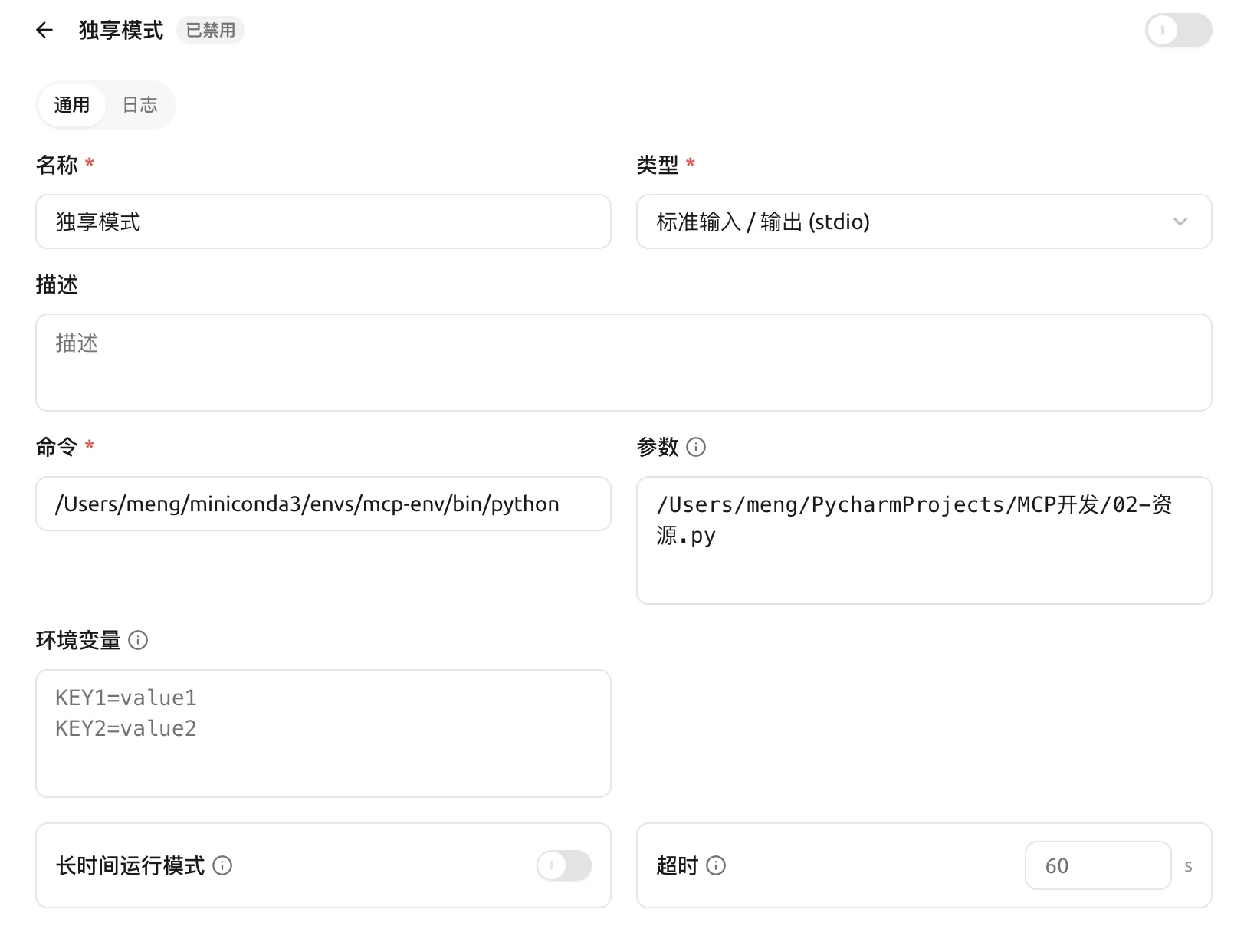
Stdio 是 MCP 的本地专属通信模式,客户端将 MCP Server 启动为本地子进程,通过系统标准输入输出管道,以 JSON-RPC 2.0 格式完成进程间通信。该模式无网络、HTTP 及会话封装开销,通信损耗极低、响应高效,但仅支持单机一对一独占连接,无法跨网络、不支持多客户端并发,主要适用于本地开发调试、IDE 插件、个人桌面工具等本地轻量化场景。
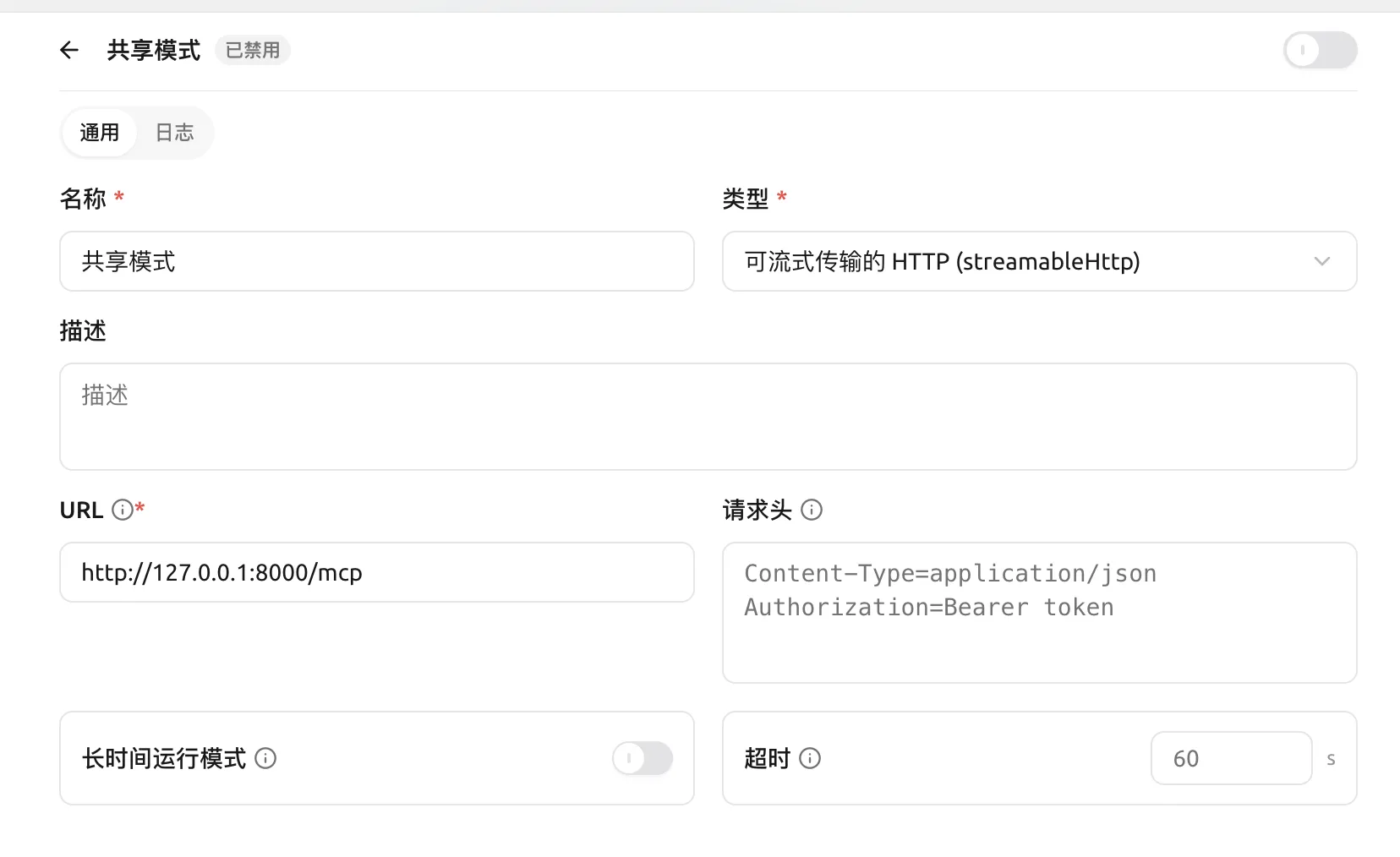
Streamable HTTP 是 MCP 官方唯一的远程通信标准。在这种模式下,MCP Server 跑成一个独立的网络服务,依靠标准 HTTP 协议做双向流式数据交互,可以做会话管理、权限校验,支持多个客户端同时访问,也能直接部署到云端分布式环境。
本地单机、追求速度、选 stdio。远程联网、多人共用、选 streamable http。
# 1. stdio 传输模式
mcp.run(transport='stdio')

# 2. streamable-http 模式务
# mcp.run(transport='streamable-http')
3. 异步工具
我们在定义 mcp 的工具函数时候,可以使用 async def 定义异步工具,也可以使用 def 定义同步工具。两者区别:
当使用 async def 定义工具函数,工具直接在事件循环调度执行,适合 IO 密集场景。注意:千万不要在 async 工具内部执行长时间同步 CPU 计算,会直接阻塞事件循环,导致整个 MCP 服务无法响应其它请求。
当使用 def 定义 MCP 工具函数,MCP SDK 会将其放到线程池执行,避免阻塞事件循环,适合 CPU 计算密集或者同步 IO 任务。注意:这是线程池而非每次新建独立线程,Python 线程受 GIL 限制,不能实现 CPU 真正并行加速计算,只是把耗时 CPU 计算移出事件循环,避免阻塞事件循环。
具体工具采用哪种方式,需要结合业务场景选择。如果全部使用 def 同步工具,并发能力会受线程池最大线程数限制。如果全部使用 async def 异步工具,一旦出现 CPU 密集任务就会阻塞事件循环,拉低整体并发。因此实际 MCP 服务中,通常混合使用两种定义,针对每一个工具的任务特性单独选型,而非整个服务统一使用同一种写法。
import asyncio
import time

from mcp.server import MCPServer
from pydantic import BaseModel


mcp = MCPServer('my tools')


@mcp.tool()
def add(a: int, b: int) -> int:
    """两个数字相加
    Args:
        a: 第一个数
        b: 第二个数
    """
    # 模拟进行大量计算
    time.sleep(2)
    ret = a + b
    return ret

# 手动注册
# mcp.tool()(add)


class ForecastItem(BaseModel):
    day: str
    temp: int

class WeatherResult(BaseModel):
    loc: str
    temperature: int
    wind: int
    forecast: list[ForecastItem]

@mcp.tool()
async def get_weather(loc: str) -> WeatherResult:
    """获得指定城市的天气情况
    Args:
        loc: 城市名称
    """
    # 模拟进行外部网络请求
    await asyncio.sleep(3)

    res = WeatherResult(
        loc=loc,
        temperature=38,
        wind=8,
        forecast=[
            ForecastItem(day="今天", temp=38),
            ForecastItem(day="明天", temp=35)
        ]
    )

    return res


if __name__ == "__main__":
    # 1. stdio 传输模式
    mcp.run(transport='stdio')

    # 2. streamable-http 模式
    # mcp.run(transport='streamable-http', host='127.0.0.1', port=9000)
4. 连接工具
下面是 Cherry Studio 中不同模式的配置:
 冀公网安备13050302001966号